ChatGPT conversations, one at a time
OpenAI's data export is all-or-nothing JSON. ChatPeer exports the single conversation you're reading as Markdown, PDF, JSON or plain text.
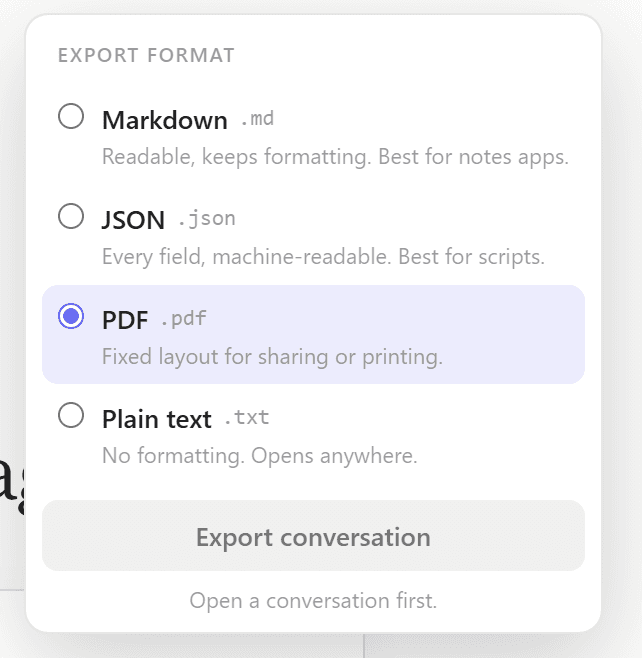
The file is built in your browser from ChatPeer's local message store, so export is fast, works offline, and never sends the conversation anywhere. The conversation title becomes the filename.
Click the ChatPeer button in the conversation header and pick a format. Markdown keeps fenced code blocks with their language tags; PDF gives each speaker a coloured accent bar and a timestamp. Premium can select several conversations and download them as a ZIP.
Free exports plain text. Markdown, PDF, JSON and bulk ZIP export are premium. A conversation has to be indexed before it can be exported, which happens during the first sync.
OpenAI lets you export your entire ChatGPT data archive, but it's all-or-nothing and the format is awkward JSON meant for data portability, not reading. There's no way to export a single conversation to a clean Markdown file, a readable PDF, or a structured JSON you can use in your own tools. ChatPeer adds an export button to the ChatGPT conversation header. Choose your format, click once, and the file downloads to your computer. The export pulls from ChatPeer's local message store, so it's fast and works offline. Plain text export is free; Markdown, PDF, and JSON are premium.
Exporting a single conversation
Open any conversation on ChatGPT. The ChatPeer toolbar button appears in the conversation header. Click it, choose a format from the dropdown (TXT, Markdown, PDF, JSON), and the download begins. The conversation title becomes the filename.
Markdown with code block preservation
ChatGPT conversations often contain code. The Markdown exporter preserves fenced code blocks with their language tags, so code renders correctly when you open the file in VS Code, GitHub, Obsidian, or any Markdown viewer.
PDF with conversation structure
The PDF exporter generates a clean A4 document. Your messages have a blue accent bar; ChatGPT's responses have a violet one. Each message shows its timestamp. Page numbers run at the bottom. No watermarks, no upsell, no branding beyond the ChatPeer attribution in the footer.
Bulk export for power users
Premium accounts can export multiple conversations at once. Select them in ChatPeer's conversation list, click 'Bulk export', choose a format, and download a ZIP file with one file per conversation. Useful for archiving a project or moving your history to another tool.
Questions about this feature
It's different. OpenAI's export gives you your entire history in their JSON format. ChatPeer lets you export individual conversations in readable formats (Markdown, PDF) or structured JSON for your own use.
Yes. Markdown export preserves language-tagged fenced code blocks. PDF export renders code in a monospace font with a slightly different background.
No — ChatPeer exports from its local store. If a conversation was created before you installed ChatPeer, it will be indexed during the initial sync (which happens automatically on first install).
Stop scrolling for it
Free to install. No account required.