Star the one reply that mattered
The useful part of a long thread is usually one answer in the middle of it. Mark that message, give it a colour and a note, and open it again from anywhere.
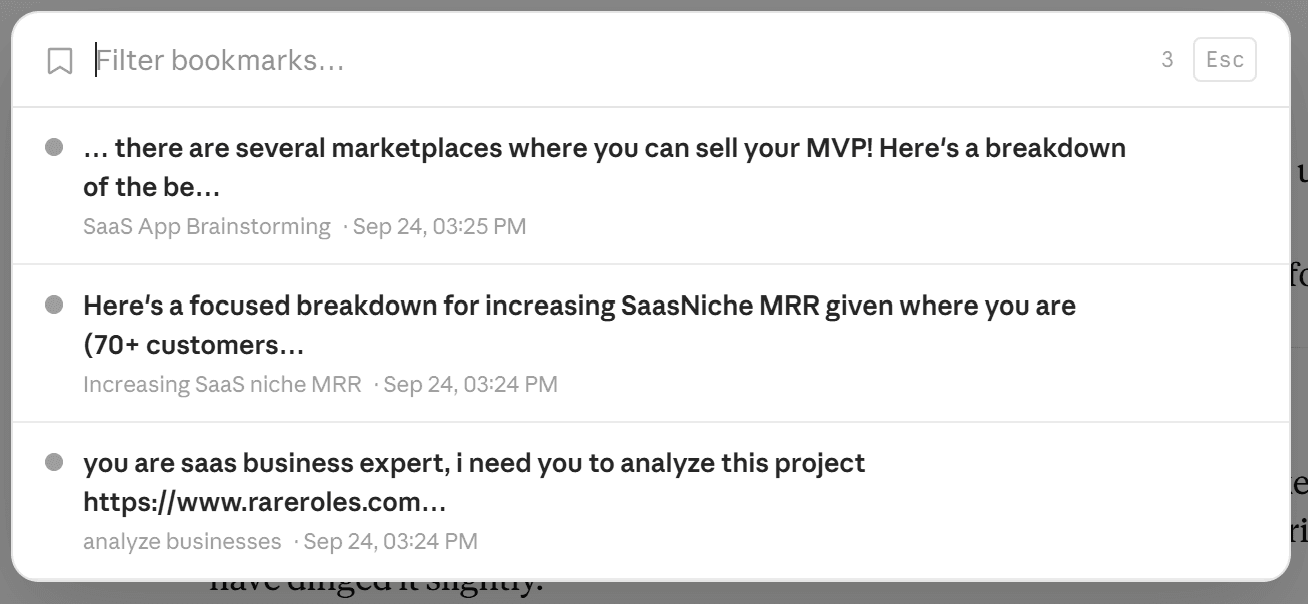
A bookmark points at one message and captures its conversation title alongside, so the entry still makes sense months later. Bookmarks are kept per platform in your browser's local database — nothing about which messages you saved, or why, reaches us.
Every search result carries a star; click it to bookmark that message. Add a colour for scanning and a note for the reason you kept it. Open the panel from the toolbar or the floating menu, filter by title or note, and click through.
Free keeps 2 bookmarks; premium removes the limit. On Claude a bookmark opens the conversation but not the exact message — Claude's transcript carries no per-message identifier to scroll to. On ChatGPT it lands on the message itself.
The useful part of a long conversation is usually one answer buried in the middle of it. Neither Claude nor ChatGPT lets you mark that message, so finding it again means opening the conversation and scrolling until you recognise it. ChatPeer adds bookmarks at the message level: star the specific reply that mattered, give it a colour and a note explaining why you kept it, and it appears in a panel you can open from anywhere. Clicking it takes you back to that conversation — and on ChatGPT, straight to the message itself, highlighted so you can see which one it was.
Bookmarking a message
Every search result carries a star. Click it and that message is bookmarked, with the conversation title captured alongside so the entry still makes sense months later. Bookmarks are per platform, so your ChatGPT, Claude and Grok bookmarks stay in separate lists.
Colours and notes
A bookmark can carry a colour and a free-text note. The colour is for scanning — one colour for things to action, another for reference — and the note is for the thing you'll otherwise forget, which is why you saved it. Both are editable later from the bookmarks panel.
Getting back to the message
Open the bookmarks panel from the toolbar or the floating ChatPeer menu, filter by title or note, and click an entry. On ChatGPT you land on the message itself: ChatPeer walks the conversation until that message renders — necessary because long ChatGPT threads only keep a handful of messages in the page at a time — then scrolls to it and flashes it briefly. On Claude you land on the conversation; jumping to the exact message there is not yet supported, because Claude's transcript exposes no per-message identifier.
Free tier
Free accounts can keep 2 bookmarks, which is enough to see whether the feature fits how you work. Premium removes the limit.
Questions about this feature
A folder groups whole conversations; a bookmark points at one message inside one. They're complementary — a conversation can sit in a folder and still have three bookmarked replies.
On ChatGPT, yes — it scrolls to the message and highlights it. On Claude it opens the conversation only. Claude's transcript is virtualised and carries no message IDs in the page, so there's nothing to scroll to by identifier. It's on the roadmap.
No. Like folders and search, bookmarks live in your browser's local database. Nothing about which messages you saved, or why, reaches us.
Stop scrolling for it
Free to install. No account required.