Search every model at once
Was it ChatGPT, Claude or Grok? Doesn't matter. Press Ctrl+Shift+K anywhere in Chrome and one search covers every chat on every model, grouped into tabs with a count each.
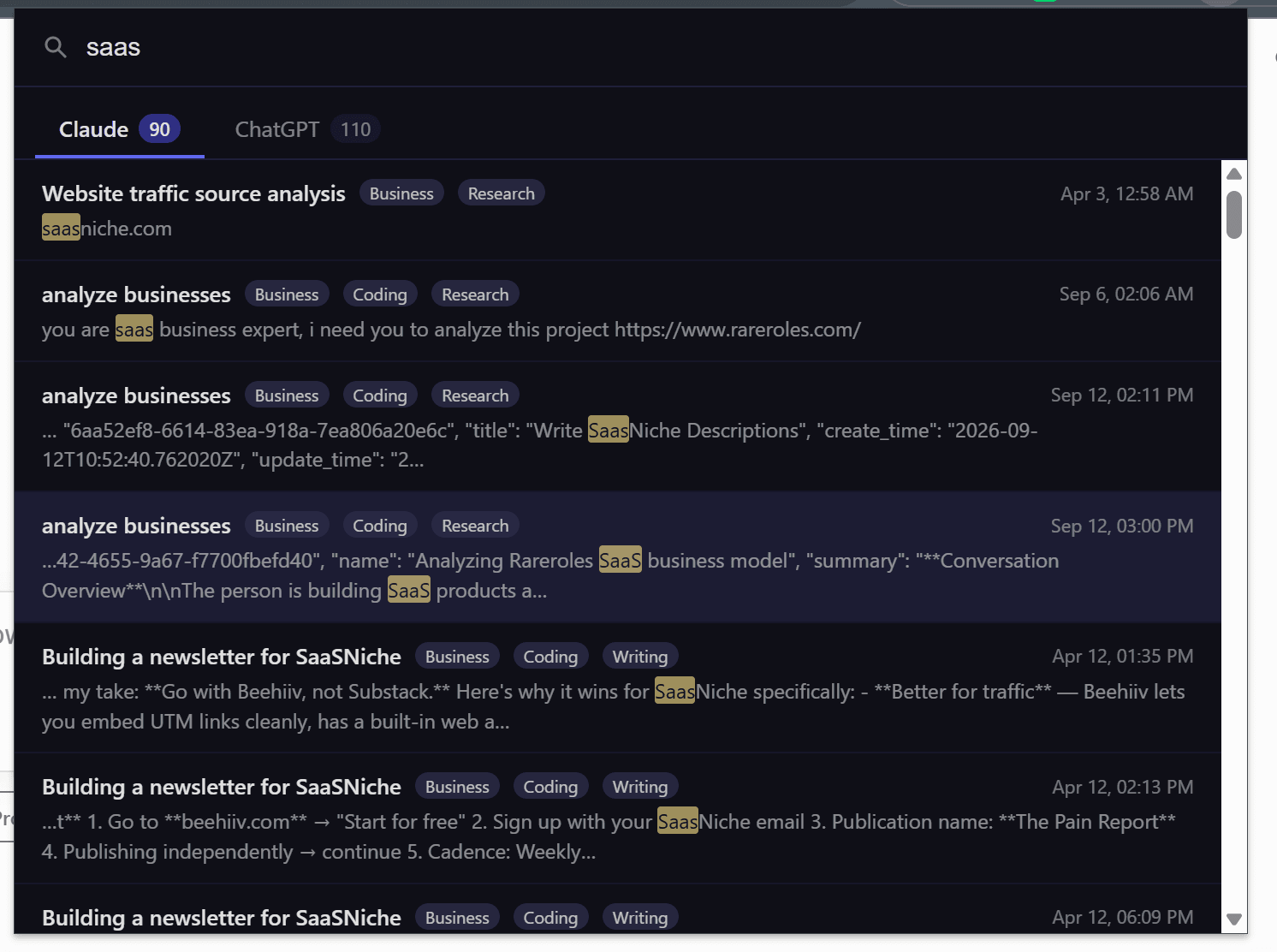
Each platform is indexed separately, through its own API and your own session. The shortcut is registered as a Chrome command rather than an in-page handler, so the background service worker holds every platform's index and merges the results locally. There is no shared server-side index.
Ctrl+Shift+K from any tab, even a blank one — none of the sites needs to be open. A tab per platform shows its match count, Tab moves between them, the arrow keys move through results, and Enter opens the conversation on the right site.
This is the All Access feature: Monthly and Lifetime unlock all three platforms individually, but not one search across them. Tabs appear only for platforms with matches. Rebind the shortcut at chrome://extensions/shortcuts if it clashes.
Most people who use AI seriously use more than one. A question gets asked on Claude one week, ChatGPT the next and Grok the week after, and six months later you remember the answer but not which site it happened on. Checking them all means three tabs, three searches, and three sets of results you have to reconcile in your head. ChatPeer's cross-platform search collapses that into one query: search every model at once. Press Ctrl+Shift+K anywhere in Chrome — you don't need to be on chatgpt.com, claude.ai or grok.com, or even have them open — and a search window appears. Type once and every local index is searched at the same time, with a tab per platform showing how many matches each one holds. Nothing is uploaded to run the search: the indexes already live in your browser, so the query never leaves your machine. Cross-platform search is the feature the All Access plan exists for.
A global shortcut, not an in-page one
The in-page search modal (Ctrl+Shift+F) only exists on a tab where ChatPeer is running. Cross-platform search is different: it's registered as a Chrome command, so Ctrl+Shift+K works from your email, a spreadsheet, or a blank tab. If the shortcut clashes with something else you already use, you can rebind it at chrome://extensions/shortcuts without reinstalling.
Results grouped into platform tabs
Results are split into a tab per platform, each labelled with the number of matches it holds — 'Claude 12', 'ChatGPT 5', 'Grok 8'. The tab for whichever site you were last on is selected first, since that's usually what you're looking for. Tab and Shift+Tab move between platforms, the arrow keys move through results, and Enter opens the highlighted conversation on the correct site in a new tab. The counts always reflect every match found, not just the ones currently listed.
Why it needs its own index
Each platform's messages are indexed separately, because each is fetched through that platform's own API using your existing session. Cross-platform search queries every platform's index through ChatPeer's background service worker, which holds them in memory and merges the results. Because the merge happens locally, adding another platform costs you nothing in privacy — there is no shared server-side index, and there never was.
Smart tags carry across
Each result shows the smart tags ChatPeer assigned to its conversation, so a search for 'pricing' can be read at a glance as three Business conversations on Claude and one Research thread on ChatGPT. Tags are computed on your device from the same local data.
Questions about this feature
All Access. Monthly and Lifetime unlock the premium features on all three platforms, but searching all three histories together in one window is what distinguishes All Access.
No. The search window is part of the extension, not the page, so Ctrl+Shift+K works from any tab in Chrome. It searches whatever ChatPeer has already indexed.
No. Every index is stored in your browser and the query runs against them locally. The only request ChatPeer ever makes to our servers is license validation.
You'll see a single tab. Tabs only appear for platforms that actually have matches for your query.
Stop scrolling for it
Free to install. No account required.