Grok conversations, one file at a time
Grok's own export is your whole account as JSON. ChatPeer saves the conversation you pick as Markdown, PDF, JSON or plain text, built in your browser.
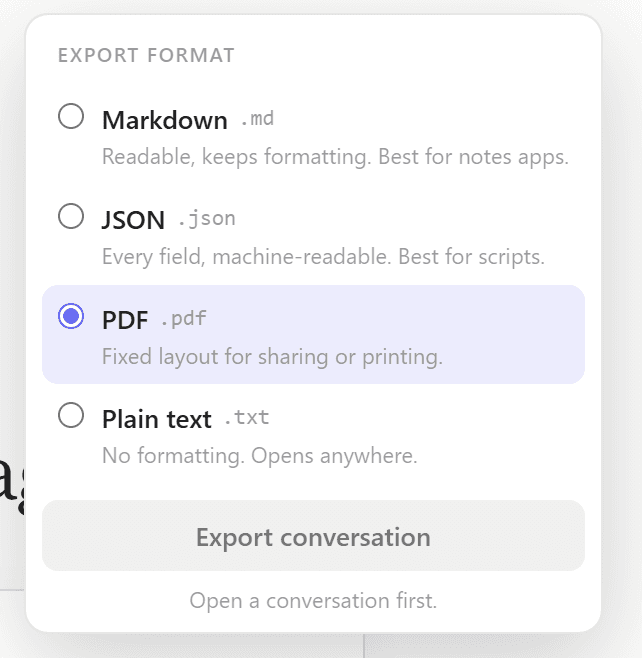
Export reads the local copy ChatPeer already keeps of your Grok conversations and writes the file in the page, PDF included. Nothing is uploaded to produce it.
Open a conversation, click Export, pick a format. Markdown carries YAML frontmatter, JSON keeps every field, PDF colour-codes each speaker with timestamps and page numbers. Paid plans can take several conversations as a ZIP.
Free exports plain text, one conversation at a time. Markdown, PDF, JSON and bulk ZIP export are on every paid plan.
Grok can hand you your data, but only all of it: the account export in Settings packages your entire history as one JSON archive. That's useful as a backup and awkward for everything else. When you want the one conversation you're reading as a document — for your notes, a pull request, a client, or just to keep — the usual route is selecting it by hand and pasting it somewhere, which drops the structure and mangles the code. ChatPeer adds an export button on grok.com. Choose Markdown with YAML frontmatter, a colour-coded PDF, structured JSON or plain text, and the file is written straight to your downloads from the copy ChatPeer already keeps in your browser. Plain text is free; the other formats and bulk ZIP export come with any paid plan.
Markdown for your notes
The Markdown file opens with a YAML block holding the title, platform, export time and message count, followed by one section per message separated by rules. Code keeps its fences, so it reads properly in Obsidian, Notion, VS Code or a repository.
PDF to share
The PDF is an A4 document with a coloured accent bar for each speaker, a timestamp on every message and page numbers at the foot. It's written by a PDF builder inside the extension, so no server ever sees the conversation. It covers English and Western European languages; for scripts outside that range, Markdown is the better choice, and ChatPeer tells you so rather than handing you a broken file.
JSON for your own tools
JSON keeps every field ChatPeer stores — message IDs, roles, timestamps — in a { version, conversation, messages[] } shape that's easy to script against or import elsewhere.
Many at once
On a paid plan you can export several Grok conversations together as a ZIP, one file per conversation in the format you choose. Handy for archiving a finished project.
Questions about this feature
Grok's export gives you your whole account as JSON. ChatPeer exports the conversation you choose, in a format you can read or drop straight into another tool.
No. It's generated in your browser and saved to your downloads. ChatPeer doesn't keep or log what you export.
Plain text, one conversation at a time. Markdown, PDF, JSON and bulk ZIP export are included in every paid plan.
Stop scrolling for it
Free to install. No account required.